Lufetia: A Whimsical Script Handwritten Font for Joyful Design
What Is Lufetia?
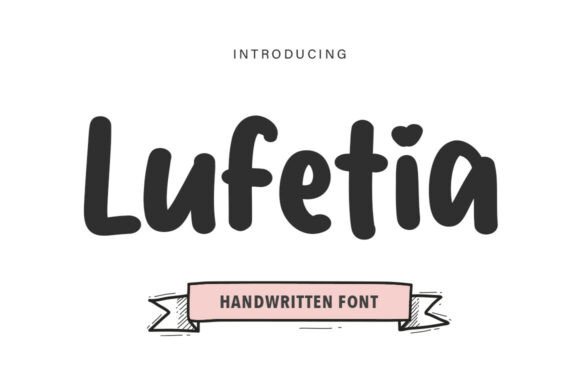
Lufetia is a thick, pillowy handwritten display font that radiates cheerful charm and playful sophistication. Designed for impact at larger sizes, it belongs firmly in the Script Handwritten category—but stands apart with its ultra-bold, rounded letterforms and generous spacing. If you're searching for a Lufetia free download or reliable Lufetia font download, you’ll find it widely available across reputable font platforms—though licensing terms vary by source. Unlike many delicate script fonts, Lufetia delivers bold presence without sacrificing warmth, making it ideal for designers who want personality *and* professionalism in one package.
Letterforms: Pillowy, Playful, Purposeful
Lufetia’s characters feel hand-drawn but carefully engineered—each curve is smooth and intentional, with subtle bounce and organic variation. The terminals taper gently, and the baseline sways just enough to suggest movement without compromising legibility. This isn’t a chaotic “doodle” script; it’s a refined Script Handwritten typeface built for visual confidence.
Weight & Contrast: Bold Without Brutality
With its ultra-bold weight and even stroke distribution, Lufetia avoids harsh contrast while still commanding attention. That makes it more versatile than high-contrast scripts like Great Vibes or Allura—and far more screen-friendly than ultra-thin alternatives. It’s a premium Script Handwritten font that earns its place in professional workflows.
Spacing & Rhythm: Generous, Airy, Readable
Unlike cramped script fonts that collapse at smaller sizes, Lufetia breathes. Its generous letter-spacing and open counters ensure clarity—even when scaled down for subheadings or social media captions. That rhythm gives it surprising adaptability across contexts, from packaging to digital banners.
Lufetia for logo design
Lufetia shines in logo design where brand voice leans warm, approachable, or artisanal—think bakeries, children’s brands, or wellness studios. Its thickness holds up beautifully in vector formats, and its distinct personality helps logos stand out in crowded markets.
Lufetia for branding
As part of a broader branding system, Lufetia works best as a primary display element—not body text. Paired with clean sans-serifs or gentle serifs, it adds emotional texture to tone-of-voice guidelines, style guides, and brand storytelling assets.
Lufetia for wedding invitations and cards
Its whimsical charm makes Lufetia a natural fit for wedding stationery—especially for rustic, garden, or modern-elegant themes. When used thoughtfully (e.g., names and dates only), it conveys intimacy without sacrificing polish. Just avoid dense paragraphs: this is a free Script Handwritten font for Fonts that excels in moments, not margins.
Lufetia for posters and social media
On Instagram carousels or event posters, Lufetia grabs attention instantly. Its weight ensures readability even on mobile screens, and its friendly vibe encourages engagement—ideal for promotions, announcements, or community-driven campaigns.
Lufetia for packaging
From jam jars to candle labels, Lufetia adds handmade authenticity to product packaging. Its boldness translates well to print, and its consistency across characters supports cohesive shelf presence—especially when paired with minimalist typography for ingredients or descriptions.
Font Pairing & Combinations
Wondering what fonts pair well with Lufetia? Start simple: a neutral sans-serif like Inter or Montserrat provides perfect counterbalance—clean, structured, and highly legible. For elevated contrast, try a low-contrast serif like Playfair Display or Cormorant Garamond. These combinations let Lufetia lead while grounding the layout. Avoid pairing it with other scripts—this dilutes its impact. Instead, lean into contrast: soft curves + crisp geometry = timeless Lufetia font pairing. Pro tip: test pairings at real size—on screen and in print—to assess hierarchy and harmony.
Licensing & Commercial Use
So, is Lufetia free for commercial use? It depends on your source. Some platforms offer a limited personal-use version for free, while full Lufetia commercial use requires a paid license. Always verify the Lufetia font license before deploying in client work, merchandise, or digital ads. Reputable sellers like CreativeFabrica include clear usage terms—often covering web, app, and unlimited print projects. Never assume “free download” means “free for commercial use.” When in doubt, buy the official license—it’s affordable insurance for professional integrity.
How to Download & Use Lufetia
To get started, look for a trusted download Lufetia font free option—or invest in the premium version for expanded features and full rights. You’ll find Lufetia on CreativeFabrica, DaFont (check license notes), and select independent foundries. Once downloaded, install the .OTF or .TTF file system-wide. In how to use Lufetia in Canva/Word/Photoshop: it appears in your font menu after installation—no plugins needed. In Canva, upload it via Brand Kit; in Photoshop, select it from the Type tool dropdown; in Word, it behaves like any system font. For web use, embed via @font-face or platform-specific tools (e.g., Canva’s custom font upload).
Designer Notes & Tips
Before committing to Lufetia, test it in black-and-white first—its charm lives in shape and spacing, not color. Check readability at 24pt and below: while excellent for headlines, it’s not meant for long-form body copy. Also, compare spacing across words—some script fonts need manual kerning; Lufetia handles most common pairs well, but always preview “The Quick Brown Fox” to spot tight or loose clusters. Curious how Lufetia vs similar font options stack up? Try side-by-side tests against Bello Pro or Poppins Script—Lufetia wins on warmth and weight, while others may edge ahead in versatility or multilingual support. As a professional Fonts font, it’s not a Swiss Army knife—but when you need joyful authority, it delivers with unmistakable sincerity.